Welcome ConnectiCon XXIII
July 16-19, 2026
INTRODUCTION
Welcome to the Connecticon Convention Center! Here at the Center we aim to provide excellent paid telecommunications services to event vendors that meet, or exceed, their expectations and allow them to deliver their full experience to prospective clients and customers. This guide serves as a quick Frequently Asked Questions guide on what you may need to know before purchasing wired or wireless services from us, what to expect during show hours, and how we can best help you if issues arise.
PURCHASE
Internet services can be purchased in one of three ways:
- You can purchase services in advance using our website form and Paypal with most major forms of payment accepted.
- You can purchase services in advance by emailing our Exhibitor Services team with your selections and payment information.
- You can purchase services on-site by visiting our Exhibitor Services Desk, typically located in the back of Exhibit Hall A near the Loading Dock entrance.
If you have a Square or similar point-of-sale (POS) device you will be using on the wireless network, please let our Exhibitor Services team or the IT Administrator know upon purchase or pick-up. See FAQ below for details.
We highly encourage all vendors to purchase their services in advance either using our web-based form, or email, as you receive a discount on services ordered compared to purchase on-site, as well as avoiding filling out the necessary paperwork onsite.
After you complete your purchase, or if you are checking-in with the Exhibitor Services Desk during Vendor Move-In, you will receive a card with the name of the network, a code printed on a sticker, and a QR code linking back to this page. This code will serve as your access code to input on to your device in the wireless captive portal to access our network. If you ordered wired internet services, the Center’s IT Manager or another representative will inform you when the cable has been placed and is ready for use.
CONNECTING TO THE WIRELESS NETWORK
Provided a card with the wireless network name and code from our Exhibitor Services team, connect to the network name as noted on the card with your device(s) You should be automatically directed to your device’s web browser and presented with a Captive Portal “splash screen”. If you do not see this automatically, you may have to manually open a web browser (Firefox/Chrome/Safari/etc.) and attempt to navigate to a website for the redirect to occur. Once there, enter the code as displayed on your card.
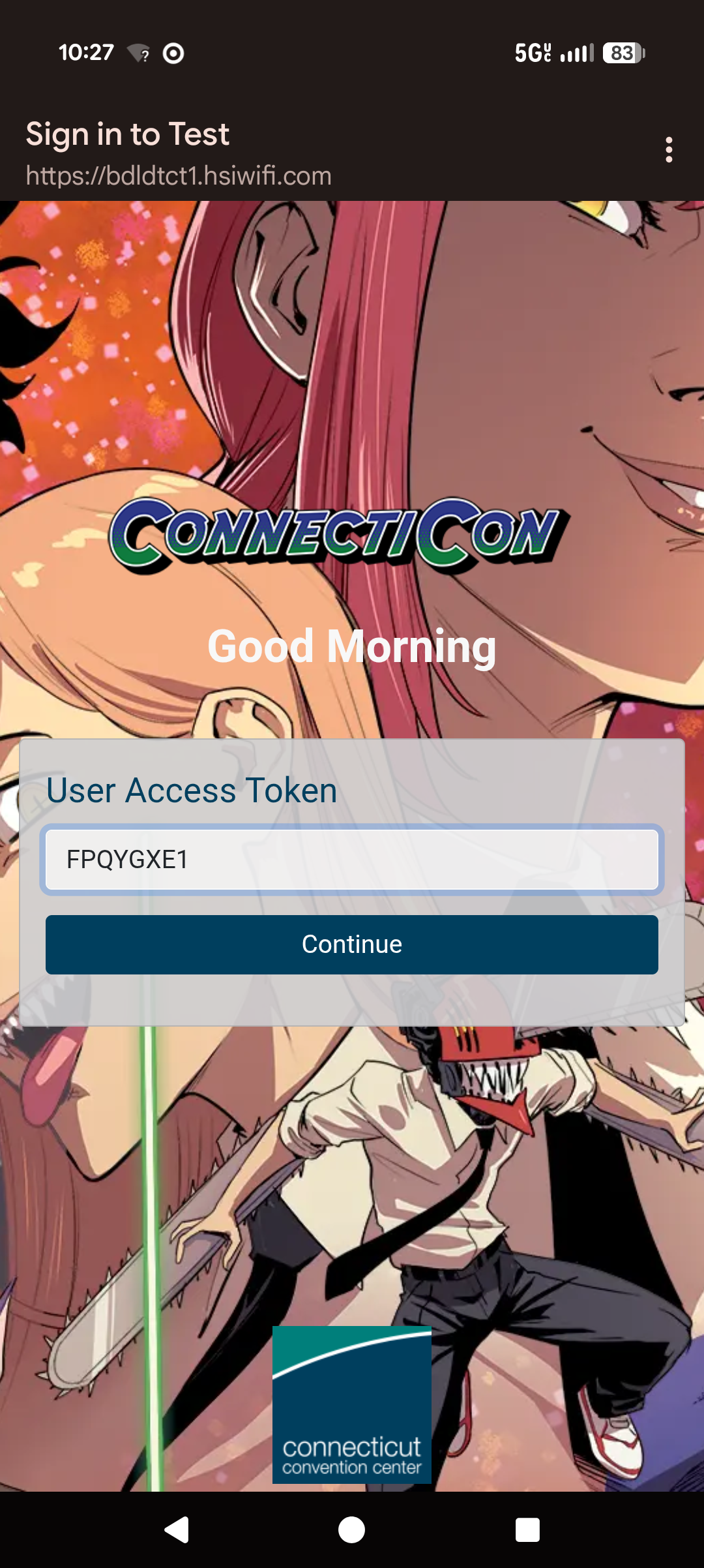
Upon success, you will either be redirected to a web page of the event organizer’s choosing, or back to the last screen you were on, typically your wireless selection.
WIRELESS NETWORK CODE FREQUENTLY ASKED QUESTIONS
How long does my code last for? Your code will last for the specified number of days you paid for when placing your order, typically either for a single day, or for the duration of the event.
When does the “time” start on my code? The time starts when the code is first used and your device has been registered.
Can my code be used on another device? Because you pay per-device, once you have registered your device, that device’s Media Access Control Address (MAC) is registered to the code and cannot be changed. However, as a courtesy, your code can be used on up to one additional device in case you decide to change your mind on which device you’re using, your device runs out of battery, or you have circumstances where someone else needs to “substitute” in for you. If you have technical issues or a circumstance that requires assistance resolving this limitation, please contact the Center’s IT Administrator for further assistance.
My code is not working after returning for the next day/I am having to re-enter the code each time it reconnects? In most cases, your device should automatically reconnect to the wireless network without the need to re-enter the code, as the recognized MAC persists in the system after registration. This should also be true even if your device uses privacy controls such as “randomized MAC” as those do not typically change for the selected network. However, in the rare case this does not work or you encounter difficulties, please contact the Center’s IT Administrator for further assistance.
My device does not support Captive Portals or I cannot see the Captive Portal? With some hardware devices, such as Square-branded point-of-sale (POS) devices and other similarly-branded POS devices, these do not support Captive Portals for connecting with. When purchasing your wireless for these devices, please let our staff know and we will provide you with an alternate means of connecting that device.
WIRELESS NETWORK USAGE
PLEASE NOTE: Per FCC guidelines on “Rogue Network Detection and Mitigation”, the Connecticut Convention Center does not engage in, or make any attempt to, block the lawful transmission and usage of consumer “hotspots”, as defined. We do however, monitor their visibility and attempt to adjust our radio channels and power transmission to attempt to provide a quality experience for our paid users. However, depending on the number of attendees with smartphones or other wireless-enabled devices, or other radio-generating devices, interference and instability may occur during peak attendance in an event, especially in the Exhibit Halls and Ballrooms due to the building’s construction materials (concrete walls, metal beams, etc.) or other localized interference. The Connecticut Convention Center is NOT responsible for any vendor, or attendee, personal wireless hotspot device, usage, or technical issues that may arise from localized interference. Similarly, we do not provide any kind of technical support to person(s) contacting us regarding poor performance of their wireless hotspot. We apologize for the inconvenience.
All internet usage at the Connecticut Convention Center using wireless networks provided for-fee by the Center are subject to both network monitoring, and usage analytics, for quality control and optimization purposes. No personal information beyond a device’s “hostname”, make/model, and MAC address are collected by the system. All encrypted session data (typically HTTPS) is not viewable by the IT Administrator or any staff. All usage must conform to applicable federal and state laws.
The approximate internet speed allocated per-device is roughly 10mbps (ten megabits-per-second) up and down. This is typically more than adequate for basic internet usage, access to cloud and web applications, streaming on most major platforms at 1080p60, watching streaming content, social media usage, and more. There is no data upload or download quota, however this can be subject to change at the IT Administrator’s discretion. This is done to ensure a quality experience across all network users. This value may be raised or lowered at the discretion of the IT Administrator based on overall feedback, or current network performance. At this time, we cannot honor individual requests for additional bandwidth. If you are in need of higher speeds or have a more specialized platform, you will need to consider purchasing a wired connection. Speak with Exhibitor Services for further assistance.
The Center reserves the right to revoke access to any person or device at ANY time, without refund, if evidence of misuse has been found or any applicable rules subject to the event organizers have been made known. Usage of the wireless network is a privilege, and not a right.
REFUNDS
In the event that you have to leave the premises or have an emergency, you may be eligible for a full or partial refund of your wireless network purchase subject to the review of our Exhibitor Services team and/or IT Administrator. Please contact them for further information.
WIRED NETWORK SERVICES
In addition to wireless network services, we also offer wired network services. This utilizes The Center’s vast wired ethernet backbone to provide more stable, continuous service for either end-point devices, or a specialized use-case, such as a BYOD router and wireless setup, switch with multiple endpoints, high-demand bandwidth applications, digital signage, and more. Purchase is made similarly to wireless above on our website or at the desk on-site, and you would select the number of connections you require. For most people, this would only be one cable/connection to an endpoint or device (often referred to as the “uplink”), but if more than one is required, please notify Exhibitor Services so the IT Administrator can review and suggest the best course of action.
No Captive Portals, codes, or any kind of authentication is required, simply plug the cable in and connect, assuming your device is configured for DHCP. If it is not, you will need to set it as such, or speak with the IT Administrator for further assistance. Bandwidth speeds are not “capped”, however there is a monitoring system that does note the overall usage of the port, and depending on higher usage, additional fees may apply. The purchase price reflects “typical” usage of most standard websites, applications, social media, and so on. All other usage is subject to the same rules as above.
CONTACT US
If you have any additional questions, comments, concerns, or need to start your purchase, please visit our website to get started. We hope your time here is productive and rewarding!
Exhibitor Services
Email
Phone: 959-221-4459
IT Administration and Services
Email
Phone: 860-335-8843